

mobilni telefoni
5 most common problems with your phone and how to solve them…

Uroš Vogrinec

First of all, a warm greeting.
Considering that you are here, I assume that you own a smartphone.
You probably spend quite a bit of time on it every day, and that is why you probably don't want any technical problems to arise.
Otherwise, I really can't know from that distance whether your phone is currently in good or bad condition...
But I know that in any case you probably want to know the most common smartphone problems and also know their solutions before you really need them in practice.
And yes...
There are many problems with smartphones...
But fortunately, those
5 most common let's solve it ourselves...
Before we get there, let me quickly introduce myself.
My name is Uroš and I am the co-owner of the Kron technical service, where we have repaired more than 75,586 devices in the 30 years of operation.
And no - I'm not telling you this to brag, I just want to tell you something else...
Since I have already faced thousands of broken phones in my career, I can tell you from home & from practice what you can do to avoid the total collapse of your phone.
So...
Now that we have got that out of the way, I suggest we look at the first common problem and its solution...
#1: Snail...
Yes...
A slow phone is one of the most common and one of the most annoying problems that can occur with your electronic friend.

This is often related to the age of the phone, but it is no longer uncommon for newer phones to run slower than expected.
The reason is usually that the RAM itself is overloaded.
The solution to this is to delete certain applications and other data that you no longer need.
If nothing special happens in this case, then upload your pictures and videos to an external hard drive or simply save them to Google Drive.
This relieves your phone of the heavy backpack you carry around and allows it to run faster...
#2: Mayfly...
Another very common problem is the battery, which has a shorter lifespan than a mayfly.
It usually lets you down just when you need your phone the most.
Although there are many different factors that affect the lifespan of your battery (which you don't necessarily have control over), I'll still give you a few little tricks to extend its lifespan...
- Adjust Screen Brightness
- Turn off mobile data, Wifi, and Bluetooth when not in use
- Close applications, ki jih ne potrebuješ v tistem trenutku
This way you allow the battery to save its power for when you actually need the phone :)
#3: Lava...
If you ever find yourself feeling like your phone is as hot as black leather seats in the summer, then this tip will come in handy.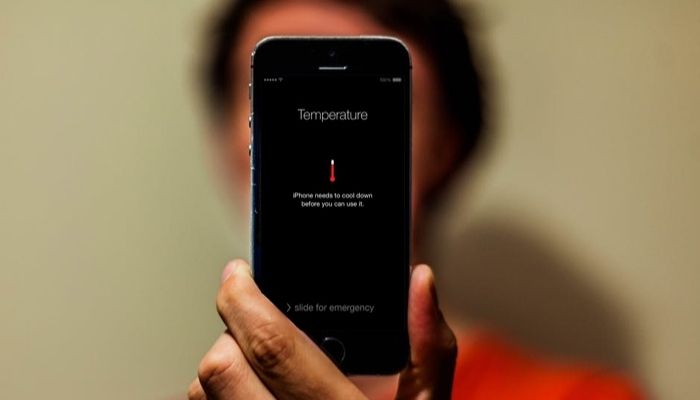
There can be several reasons for a phone that is so hot.
The most common is of course that your phone has been exposed to the sun and has overheated due to external sources. In this case, simply place it somewhere cool and protect it from the sun in all subsequent similar situations.
However, this problem is often related to the previous one, as overheating can be related to battery problems.
So, first do all the things listed in the second point, then turn off the phone and leave it alone for at least 30 minutes.
If none of the above helps, then it would make sense to contact a professional service.
#4: Glacier
A freeze is a term for a phone screen that completely freezes.
This is a common problem, but it's not as insurmountable as it may seem at the time.
If an app freezes, first close it and wait a few moments.
Also check to see if the app has any new updates or newer versions that it wants you to download.
If all the updates are installed and the app still doesn't work, it's a good idea to delete it completely and reinstall it after a while.
Also, keep in mind that there are quite a few apps on the market that have frequent technical problems, and it's possible that your phone isn't to blame for the freeze, but the app itself.
#5: Lottery...
Let me explain...
It often happens that a phone has increasing charging problems over the years.

There's almost nothing worse than not having any idea whether your phone will want to charge that day, or if it simply decides it doesn't feel like it.
Luckily for us, the most common reason for poor phone charging is just one thing...
Dirt.
Yes - you read that right...
Since the charging port is a very difficult-to-reach part, we rarely clean it. This is precisely why dust accumulates in the small hole, which prevents the flow of electricity.
And it's true that such an "intervention" often requires a visit to a qualified service center, which will handle the matter in a professional manner.
But before you head to us (or any other phone service center), here's one more thing you can try...
Simply take a dry toothbrush that you no longer need and gently clean the inside of the charging port as much as possible.
And if the reason for the poor charging is dirt, and you clean the charging port properly, then I think we have a winning combination.
So...
We have come to the end of this content-packed article, in which I revealed to you the 5 most common problems with your phone and their potential solutions...
What if I've tried everything and my phone
still isn't working as it should?
If none of the above tips helped and you are still having some problems, then I would strongly recommend that you inquire about their service as soon as possible.
*In the worst case scenario, you could lose all your data overnight.
But that's how it is...
Since not all services are the same, it makes sense to ask...
Ker niso vsi servisi enaki, se je smiselno vprašati...
Which service is the smartest to choose ?
I admit...
Here I would prefer to tell you to simply choose our service - Kron.
But because I want to remain as *UNIMPARTIAL* as possible when answering this question, I have written below 3 important criteria for choosing a provider for your computer service...
1.Satisfied customers (Are there any satisfied customers who have already been helped by this provider?)
2.Tradition (The longer the provider has been on the market, the more experience they have, and the greater the chance that they will provide quality service)
3.Flexibility (Is the provider also willing to take your phone as a priority if you actually need it the same day?)
Makes sense?
Absolutely.
And no, that doesn't mean you have to choose us.
But I can tell you that our Kron service meets all the criteria listed above...




If you want to entrust your computer to a
reliable provider…
And yes - if your computer really shows the signs of malfunctions that I entrusted to you above, and the above tips did not help you, then it is better to entrust the matter to the experts…
In the best case, you can have your computer repaired within 24 hours, so you can use it without any problems the next day : )
All you have to do is click the button below and read more about our services...
But if everything is fine with your computer (knock on wood), it won't hurt to take a look at the site.
You'll learn where to turn when you first encounter problems with your computer.
If you're not interested in this at all, that's fine. I still believe that this article was useful to you and that the tips will come in handy at some point.
See you next time,
Uroš Vogrinec, owner of Kron IT
Naši članki

Kaj narediti, če ti telefon pade v vodo?
(Večina ljudi naredi ravno nasprotno...)Najprej en lep pozdrav.Glede na to, da se nahajaš na tej str...
To je 9 bizarnih zanimivosti o mobilnih telefonih, ki jih poznajo le redki...
To je 9 bizarnih zanimivosti o mobilnih telefonih, ki jih poznajo le redki...Ja...Pametnih telefonov...
7 zanimivosti o računalnikih, ki jih verjetno ne poznaš...
7 zanimivosti o računalnikih, ki jih verjetno ne poznaš... Hej! Načeloma je računalnik naprava, ki j...imate vprašanja?